9 Ornamental Seamless Patterns: Creative Fuel for Designers, Crafters, and Small Business Owners
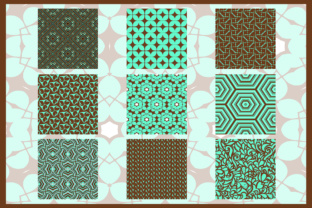
If you've ever spent hours trying to build a custom ornamental border in Illustrator—only to find the repeat doesn’t align, the spacing feels off, or the file won’t scale cleanly—you know how much time a ready-made, professionally crafted resource can save. 9 Ornamental Seamless Patterns isn’t just another bundle of clipart. It’s a practical toolkit built for real work: 9 distinct, hand-crafted ornamental designs—each delivered as an Illustrator EPS 10 vector file (with every element on its own layer), a crisp 300dpi JPEG, and a layered PSD—all in RGB, all seamless, all production-ready.
Where These Patterns Fit Into Real Projects—Not Just Mockups
Think beyond “backgrounds.” These aren’t decorative afterthoughts—they’re functional assets that solve everyday creative challenges:
- Stationery designers use them to elevate wedding suites: a delicate acanthus motif wraps perfectly around envelope liners or monogrammed notecards—no tiling glitches, no pixelation when printed at 12” x 18”.
- Small-batch textile artists drop one pattern into Spoonflower or Printful workflows and instantly test how a baroque scroll reads on organic cotton jersey—or how a geometric floral behaves across a tote bag seam line.
- Web designers building luxury brand sites apply a subtle damask variant as a CSS background image behind hero text—knowing the vector source ensures razor-sharp rendering on retina displays, while the JPG gives instant fallback compatibility.
- Etsy shop owners layer a pattern over product photos in Photoshop (using the included PSD files) to create cohesive listing banners—without needing to mask or manually stitch repeats.
Why Layered Files Matter More Than You Think
The fact that each 9 Ornamental Seamless Patterns AI file has objects on separate layers isn’t a technical detail—it’s flexibility baked in. Need to recolor just the vine scrolls but leave the central medallion untouched? Done in two clicks. Want to remove the inner filigree to simplify for laser-cut wood signage? Isolate and delete—no destructive flattening required. Even if you don’t use Illustrator daily, having that structure means your print vendor or freelance retoucher can adapt the art fast—and accurately.
And because all files are RGB and 300dpi, there’s no guesswork about color mode shifts before sending to print—or confusion about resolution when prepping for digital ads. No upsampling. No color-profile panic. Just consistency across platforms.
Who Benefits Most—and How Their Needs Differ
A freelance branding designer might license these patterns to build reusable templates for clients in hospitality or wellness—where ornamental motifs signal heritage, care, or craftsmanship. For them, the EPS files are non-negotiable: they need to embed cleanly into InDesign layouts and scale flawlessly across business cards, menus, and wall decals.
A ceramicist selling mugs on Instagram may only need the JPEGs—to overlay onto lifestyle shots in Lightroom Mobile. They’re not editing vectors; they’re creating mood. The high-res JPGs give them rich texture without app crashes or learning curves.
A church communications volunteer updating bulletin covers? They’ll likely open the PSD in free alternatives like Photopea or GIMP—tweak contrast, change a gold tone to navy, and export in seconds. The layered format lets them personalize without starting from scratch.
What to Consider Before You Apply Them
Seamless doesn’t mean universal. A pattern that sings on packaging may overwhelm a tiny favicon. Here’s what helps avoid missteps:
- Scale context first. Ornamental patterns shine at medium-to-large sizes—think book covers, fabric yardage, or wall graphics. Zoomed in too tight (e.g., a 24px web icon), fine details blur or vanish. Test at your intended output size before committing.
- Color harmony is active—not automatic. These files ship in RGB with neutral palettes (ivory, charcoal, deep teal), but that doesn’t mean they’ll auto-match your brand. Use the layered AI or PSD files to adjust hues precisely—don’t rely on global “recolor artwork” presets if accuracy matters.
- “Ornamental” implies rhythm and restraint. These aren’t maximalist prints. They’re designed to support—not dominate. If your layout already features bold typography or photography, choose a subtler pattern (like the minimalist arabesque) over a dense interlace. Let it breathe.
- Licensing clarity matters. These are for commercial use—including client work—but always verify usage rights for your specific platform (e.g., some POD services require extended licenses for certain products). The bundle includes standard commercial terms, but double-check if you’re embedding into SaaS UIs or physical products sold at scale.
Strengths That Solve Real Pain Points
What makes 9 Ornamental Seamless Patterns stand out isn’t novelty—it’s execution:
- No hidden rasterization. Unlike bundles that claim “vector” but hide embedded JPGs inside AI files, these are clean, editable paths—ideal for CNC cutting, vinyl plotting, or SVG export.
- Consistent grid alignment. Each pattern repeats cleanly at common dimensions (600x600px, 1200x1200px), so they drop into Figma, Adobe XD, or Canva grids without manual offset tweaks.
- Thoughtful contrast balance. Even intricate patterns retain legibility when overlaid on photos—thanks to intentional negative space and weight distribution. You won’t need to add heavy drop shadows just to make text readable.
- No “clipart fatigue.” These avoid clichéd motifs. Instead of generic laurel wreaths, you’ll find refined interpretations: a botanical lattice with asymmetrical leaf placement, a Mughal-inspired jali pattern with variable line weights, or a neoclassical key fret that flows naturally across corners.
When This Bundle Might Not Be Your Best Fit
It’s honest to say: 9 Ornamental Seamless Patterns isn’t for everyone. If you need photorealistic textures (like cracked plaster or watercolor bleed), this isn’t the set. If your work demands ultra-modern, minimalist geometry—think Bauhaus grids or Brutalist typography overlays—these ornamental styles may feel tonally mismatched. And if you’re building a massive library for enterprise-wide design systems, you’ll want broader variety than nine patterns provides (though many users start here, then expand).
But for the designer who needs elegance without excess labor, the maker who values precision over pixels, or the small business owner who wants polished visuals without hiring a specialist—this bundle delivers exactly what it promises: nine seamless, ornamental, production-ready patterns—ready to serve your next real project, not just fill a folder.